When I first successfully unlocked Mio C230, the major goal was to have a reliable working unit. I didn’t spend much time tweaking it. Here is my first take on tweaking it. Here are what I have done in addition to the first release.
- I didn’t find a good set of icons that I like. I used a program called IcoFx to re-create the icons. The icons now have a uniform look. The button outline is borrowed from torowl’s pack.
- The desktop’s underlying program SystemInformation(StartUp) is upgraded to the latest version 1.6.1. It now supports animation. Instead of having an ini file for each button, now there is only one ini file for everything(main.ini). The performance is better, too.
- Added MyCalculator and CapScrUtil (screen capture).
- Incorporated some registry hacks by c230.wordpress.com .
- Easier unlocking.
BEFORE YOU FOLLOW THE PROCEDURES TO MODIFY YOUR MIO C230. YOU KNOW THAT YOU MIGHT RENDER YOUR C230 UNUSABLE AND YOU MIGHT VOID YOUR WARRANTY. YOU DO THIS AT YOUR OWN RISKS. Here are the steps.
- Turn on C230 and connect it to the computer using a USB cable(not included in the package).
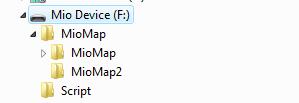
- C230 shows up as a flash drive called Mio Device. Mine is assigned as F drive. I’ll use F drive in the following steps. Substitute it with the actual drive letter of your system.
- Rename the folder F:\MioMap\MioMap to F:\MioMap\MioMap2 .
- Download MioC230r2.zip from this site or this site.
- Extract MioC230r2.zip and find the two folders MioMap and Script.
- Copy MioMap to F:\MioMap\ and copy Script to F:\ . The directory structure is like the screenshot.
- Disconnect Mio C230. The device soft reset automatically. If for some reason, the device didn’t soft reset. Use the switch on the back to do a hard reset.
- You are presented with this screen. Tap the right unlock icon to run the script to unlock the unit or tap the left GPS icon to run MioMap directly. If you decide to run MioMap directly, you need to hard reset the device to get back to this screen.
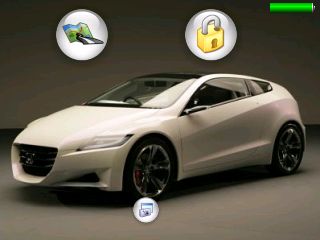
- C230 soft resets again. Here is the screenshot of the device after unlocking.
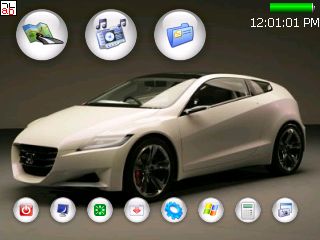
If you hard reset the machine again, you will be presented with the screen in the step 8. Just click the unlock icon again and you are good to go.
The top icons from left to right:
- MioMap: This runs MioMap. It also runs a small utility called BananaPC which provides a way to get back to the desktop. When you are ready to go back to desktop, go to the main screen where it says Mio Map v3.3. Tap and hold the top region of second 3 in v3.3. BananaPC shows up. You can tap and hold the “X” and select to exit MioMap. If you still have problems with it, please see the YouTube video I made for the release 1. Note that every time you quit MioMap, the device gets frozen frequently. Therefore, I modified the original script to do a soft reset every time MioMap is closed.
- TCPMP: A versatile media player. It plays various video formats and MP3. It can also be used to view photos. I added the plugin to play FLV video download from YouTube or other flash video sites.
- FileMan CE: File manager for CE devices. You can use it to launch other programs not on the desktop.
The bottom icons from left to right:
- Suspend: Suspends the device.
- DPMS: Puts your screen to sleep. Note that the device is still running.
- Restart: Soft resets the device. You might want to restart your machine every time you disconnect it from the computer.
- Move: A handy utility lets you move some of the full screen applications.
- MioUtility: A control panel like application for adjusting backlight, volume, screen, power, date/time and language.
- ResInfo: It shows you some resources informations for your device. Kinda like task manager in Windows.
- MyCalculator: A simple calculator. To exit out MyCalculator, tap About and then the “X” in the about screen.
- CapScrUtil: A screen capture utility. Remember to store the image to either Storage Card or My Flash Disk for easy access to the screenshots.
If you don’t like it the way it is, you want to undo everything. Here are the steps.
- Turn on C230 and connect it to the computer using a USB cable.
- Rename the folder F:\MioMap\MioMap to F:\MioMap\MioMap3 and rename the folder F:\MioMap\MioMap2 to F:\MioMap\MioMap
- Disconnect the cable and hard reset C230 using the switch on the back.
Don’t forget the other posts about Mio C230
- Plugins for Viewing Podcast on TCPMP
- Updating SpeedCam file for Mio C230
- Adding Custom POIs to Mio C230
- Adding Exit Door to MioMap 3.3
Note: The original post was viewed 2932 times and the file has been downloaded 338 times in about 2 weeks (11/16/2007). However, there are 0 donations (for me) so far. If you don’t think the information is worth a few bucks, that’s fine. Can you spend a few seconds to visit TheHungerSite and click on “Click HERE to Give – It’s FREE” to help feed the hunger? Thanks.
Find deals on Amazon.com
